Adaptive Waiting: Teaching Agents to Wait Intelligently
You've probably experienced this: You're waiting for a colleague to respond to an urgent Slack message. After 2 minutes, you start to wonder if they saw it. After 5 minutes, you consider sending a follow-up. After 15 minutes, you might call them or find someone else who can help.
You don't have a hard timeout in your head. You make a series of contextual decisions based on how urgent the task is, how long similar requests usually take, and what alternatives you have.
This is exactly how AI agents should wait - but most frameworks can't do it.
The Hard Timeout Problem
Traditional agent frameworks handle waiting with hard timeouts:
try:
    response = await agent.wait_for_response(timeout=30)
except TimeoutError:
    # Game over - escalate or fail
    raise
This binary approach creates problems:
Too short, and you abort operations that would have succeeded with a bit more patience.
Too long, and you waste time waiting for responses that will never come.
No middle ground means you can't adjust behavior as the wait continues.
In multi-agent systems, this gets worse. Agents have different response times:
- A database query might take 2 seconds
- An approval workflow might take 2 minutes
- A human review might take 2 hours
- An external API during peak load might take... who knows?
Setting the "right" timeout is impossible because there isn't one right answer.
Enter Adaptive Waiting
Playbooks takes a fundamentally different approach inspired by how humans actually wait.
Instead of a hard timeout, the framework provides periodic timeout notifications every 5 seconds (configurable) while the agent waits. Each notification gives the waiting agent:
- A reminder that it's still waiting
- Context about how long it's been waiting
- Any messages from other sources that arrived during the wait
- The opportunity to decide what to do next
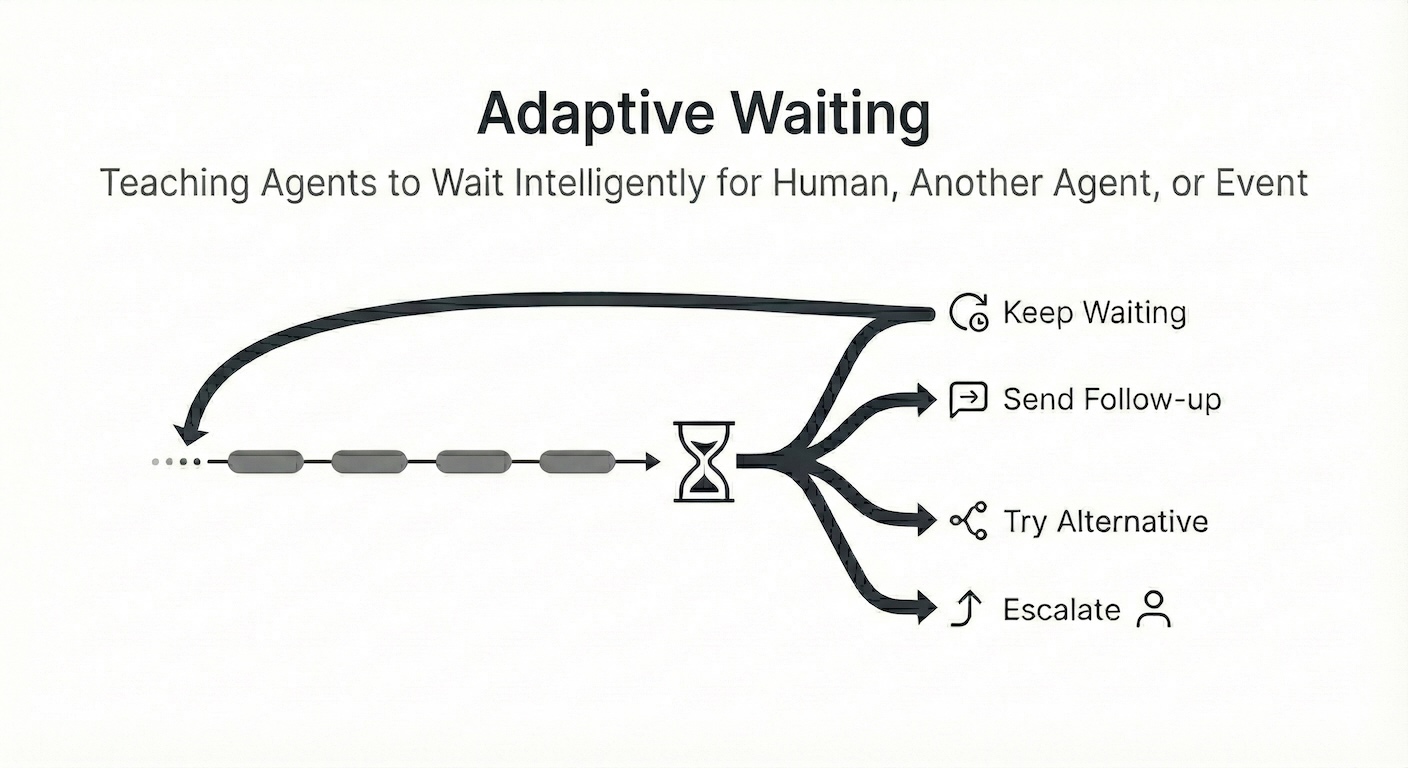
The agent's LLM then makes an intelligent decision:
- Keep waiting (maybe the task is complex and worth patience)
- Send a follow-up message (nudge the other agent)
- Try an alternative approach (call a different agent or use a fallback)
- Escalate to a human (this is taking longer than expected)
- Cancel and report the issue (something's probably broken)
There is no hard maximum wait time. The agent decides when enough is enough.
A Real-World Example
Let's say you're building a customer support agent that needs order verification from a backend system:
## HandleRefundRequest
### Steps
- Ask user for their order ID
- Ask order verification agent to verify the order
- Wait for verification result
- If order is verified
  - Process refund
  - Tell user that their refund has been initiated
- Otherwise
  - Tell user we couldn't verify their order

### Notes
- Order verification typically takes 3-5 seconds. If it takes longer than 30 seconds, there may be a backend issue. In that case, consider offering to escalate to a supervisor.
Here's what happens when the OrderVerificationAgent is slow:
At 5 seconds: The agent receives its first timeout notification. It checks the Notes, sees that typical verification takes 3-5 seconds but issues can cause delays. It decides to keep waiting - 5 seconds is still within the normal range.
At 10 seconds: Second notification. The agent is getting concerned but the Notes mention 30 seconds as a threshold. It continues waiting.
At 15 seconds: Third notification. Still within the mentioned threshold, but the agent informs the user: "Verification is taking a bit longer than usual, please bear with me..."
At 30 seconds: Now we're at the expected threshold. The agent tells the user: "I'm experiencing delays verifying your order. Would you like me to escalate this to a supervisor who can help?"
Throughout this process, if the OrderVerificationAgent does respond, that response is immediately delivered, and the workflow continues normally. Adaptive waiting is completely transparent when things work as expected.
Providing hints to the agent
The Notes section in a playbook is useful for providing hints to the agent about how long it should wait and what to do if it doesn't get a response. Without these instructions, the agent has no baseline for "this is taking too long" vs "this is normal." You may also provide these hints in the playbook's description or even the agent's description.
Alternative strategies
### Notes
- If DataAgent doesn't respond within 10 seconds, check StatusAgent for service status. If the service is down, inform the user and offer to open a ticket.
Integrating agents into human workflows
Humans don't have hard timeouts. We have patience, context, and judgment. We know when to wait, when to follow up, when to try something else, and when to ask for help. We expect other parties in the system to behave similarly.
Adaptive waiting brings this human-like decision-making to AI agents. Instead of rigid control flow with arbitrary timeouts, agents make intelligent, contextual decisions guided by natural language specifications. This is what Software 3.0 looks like.
Try It Yourself
Here's a simple example you can try:
# PatientAgent
An agent that demonstrates adaptive waiting.

## WaitForColleague
### Triggers
- At the beginning

### Steps
- Tell user "Asking my colleague to answer a simple question: What's the answer to life, universe and everything?"
- Create SlowColleague agent $colleague
- Ask $colleague to answer "What's the answer to life, universe and everything?"
- Wait for $answer
- Tell user the answer
- End program

### Notes
- SlowColleague typically responds in 2 seconds, but can take up to 30 seconds when busy. Keep the user informed and entertained frequently while waiting.

# SlowColleague
A deliberately slow agent for testing.

## Answer($question)
public: true

### Steps
- Wait 30 seconds
- Return a funny answer to the question
Run it with:
playbooks run adaptive-waiting.pb
Output:
-------------------------------------------------------------
Playbooks 0.7.4
-------------------------------------------------------------
  Compiling agent: PatientAgent
ℹ Loading playbooks from: ['examples/adaptive-waiting.pb']

[PatientAgent(1000) → User]
Asking my colleague to answer a simple question: What's the answer to life, universe and everything?

[PatientAgent(1000) → User]
My colleague is taking a bit longer than usual to ponder the deep mysteries of the universe. I'm still here and waiting for the answer!

[PatientAgent(1000) → User]
Still waiting! They say the answer to life, the universe, and everything requires a lot of deep thought. I'll let you know the moment my colleague emerges from their meditation.

[PatientAgent(1000) → User]
I'm still here! My colleague is likely double-checking the calculations with a cup of digital tea. Thanks for your patience!

[PatientAgent(1000) → User]
Still waiting on that answer! It seems my colleague is being particularly thorough today. I'm keeping a close eye on it for you.

[PatientAgent(1000) → User]
My colleague has returned! Here is the answer: After deep contemplation (and a very long coffee break), the answer is 42. But I'm still calculating
Watch how PatientAgent handles the wait intelligently, potentially informing the user about the delay.
Adaptive waiting is available in Playbooks v0.7.4+. Check out the documentation for more details on building intelligent multi-agent systems.
Playbooks AI is an open source Software 3.0 application framework.